Showing posts with label operating systems. Show all posts

Common Windows 10 keyboard shortcuts


Most used keybord shortcuts for windows 10:

  • This is several common keyboard shortcuts:
    • Copy: Ctrl + C

    • Cut: Ctrl + X

    • Paste: Ctrl + V

    • Maximize Window: F11 or Windows logo key  + Up Arrow 

    • Minimize Window: Windows logo key  + Down Arrow
    • Task View: Windows logo key  + Tab

    • Switch between open apps: Windows logo key  + D

    • Shutdown options: Windows logo key  + X

    • Lock your PC: Windows logo key  + L

    • Take a screenshot: Windows logo key  + PrtScn
    • Refresh: F5
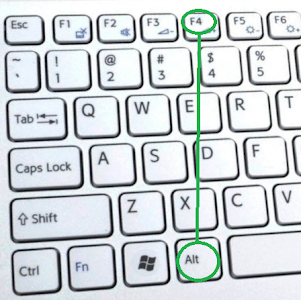
    • Close the active item: Alt + F4


Keyboard shortcut to refresh the active window in windows 10

refresh window image


What is the shortcut key for refresh the active window in Windows 10?

How to refresh the active window in windows 10 using keyboard shortcuts?


Keyboard shortcut to refresh the active window in windows 10


  • Refresh active window using : F5 in the keyboard.

  • Keyboard shortcut to refresh the active window in windows 10.
  • Press F5 on the keyboard.
  • the 'F5' key image
  • The active window will be refreshed.

Windows 10 rename item keyboard shortcut

Rename item windows 10


What is the hotkey for rename the selected item in windows 10?

How to rename the selected item in Windows 10 with keyboard shortcut?


Windows 10 Rename the selected item keyboard shortcut


  • Rename selected item : F2 in the keyboard

  • Keyboard shortcut to rename item selected in windows 10.
  • Press F2 in the keyboard.
  • the 'F2' key image
  • The selected item name will be renamed,  Edit the name and save it.

Windows 10 close the active item keyboard shortcut

White keyboard
Keyboard hotkey

How to exit the active app  in Windows 10 with hotkey?

What is the keyboard shortcuts for close the active item in windows 10?


Windows 10 close the active item keyboard shortcut


  • Close the active item or exit from app : Alt + F4 in the keyboard

  • Keyboard shortcut to close the active item or exit from app in windows 10.
  • Press Alt + F4 in the keyboard.
  •  
    the 'Alt' key image 
    +  the 'F4' key image
  • The opened item will be closed or active app will be exited.

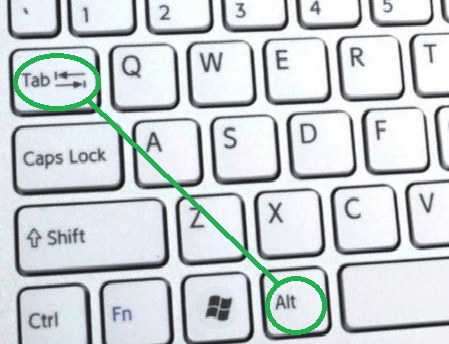
Windows 10 switch between open apps

White keyboard
Keyboard shortcuts

What is the keyboard shortcuts for switch between open apps in windows 10?

How to switch between open apps in Windows 10 with keyboard shortcuts?


Windows 10 switch between open apps keyboard shortcut


  • Switch between open apps : Alt + Tab in the keyboard

  • Keyboard shortcuts to switch between the open apps in windows 10.
  • Press Alt + Tab in the keyboard.
  • The 'Alt' key image +  the 'Tab' key image
  • It will switch to another app open in Windows

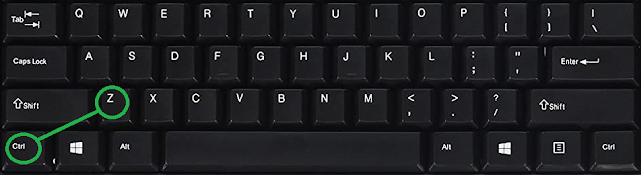
Windows 10 undo action keyboard shortcut

Desktop keyboard
Keyboard keys

What is the hotkey for undo an action in windows 10?

How to undo an action in Windows 10 with keyboard shortcut?


Windows 10 undo an action keyboard shortcut


  • Undo an action : Ctrl + Z in the keyboard

  • Keyboard shortcut to undo an action in windows 10.
  • Press Ctrl + Z in the keyboard.
  •   the 'Ctrl' key image     +  The 'Z' key image
  • The action will be undone and returned with one action

Keyboard shortcuts for cut the item in Windows 10

Black desktop keyboard
Desktop keyboard

What is the keyboard shortcut for cut the selected item in windows 10?

How to cut the selected item in Windows 10 with keyboard shortcut?


Keyboard shortcut for cut the selected item in windows 10


  • Cut selected item : Ctrl + X in the keyboard

  • Keyboard shortcut to cut item selected in windows 10.
  • Press Ctrl + X in the keyboard.
  •   the 'Ctrl' key image     +  The 'X' key image
  • The selected item will be cut and saved to the clipboard.

Windows 10 select item keyboard shortcut


Rotate keyboard image
Rotate keyboard

What is the keyboard shortcut for select item in windows 10?

How to select an element or components in Windows 10 with keyboard shortcut?

Windows 10 select item keyboard shortcut


  • Select item : Ctrl + A in the keyboard

  • Keyboard shortcut to select all items in a document or window in windows 10.
  • Press Ctrl + A in the keyboard.
  •   the 'Ctrl' key image     +  
  • The selected item will be identified and marked.

Windows 10 Paste item keyboard shortcut

Grey keyboard
Grey keyboard


What is the keyboard shortcut for paste the copied item in windows 10?

Windows 10 Paste the copied item keyboard shortcut


  • Paste copied item : Ctrl + V in the keyboard

  • Keyboard shortcut to paste The copied item in windows 10.
  • Press Ctrl + V in the keyboard.
  •   the 'Ctrl' key image     +  

  • The item will be pasted from the clipboard at the exact location that you choose.

Windows 10 copy item keyboard shortcut

Keyboard keys
Keyboard keys

What is the keyboard shortcut for copy the selected item in windows 10?

How to copy the selected item in Windows 10 with keyboard shortcut?


Windows 10 Copy the selected item keyboard shortcut


  • Copy selected item : Ctrl + C in the keyboard

  • Keyboard shortcut to copy item selected in windows 10.
  • Press Ctrl + C in the keyboard.
  •   the 'Ctrl' key image     +  the 'C' key image
  • Selected item will be copied to clipboard.