Showing posts with label Websites. Show all posts

Keyboard shortcuts JS Bin

js-bin-logo-keyboard

About JS Bin

A live pastebin for HTML, CSS & JavaScript and a range of processors, including SCSS, CoffeeScript, Jade and more...

JS Bin Keyboard shortcuts

JS Bin supports keyboard shortcuts when the editor panels are focused (i.e.you have a cursor). Shortcuts can be disabled if desired. 

Application level

ShortcutAction
ctrl+?Show keyboard shortcuts
ctrl+shift+/Search help
ctrl+lClear the console
ctrl+returnRun code and send live reload
ctrl+shift+delDelete the current bin
ctrl+sSave current state as a revision
ctrl+shift+sCreate a clone of the current bin
ctrl+shift+</kbd>Hide JS Bin navigation bar
ctrl+oOpen bin history (when logged in)
ctrl+yToggle archive state on the current bin

Note that all changes in any code panel (excluding the console) both triggers a save to the current bin and triggers a live reload on any viewers watching your bin url.

Code based

ShortcutAction
ctrl+/Toggle comments on the selected lines
ctrl+[Indent selected lines
ctrl+]Unindent selected lines
ctrl+shift+LBeautify code

HTML & CSS panel

ShortcutAction
tabCode expansion using Emmet
ctrl+alt+rightNext edit point
ctrl+shift+yEvaluate mathematical expression
alt+upIncrement number by 0.1
alt+downDecrement number by 0.1
ctrl+upIncrement number by 1
ctrl+downDecrement number by 1
alt+ctrl+upIncrement number by 10
alt+ctrl+downDecrement number by 10

HTML panel

ShortcutAction
ctrl+.Close previous HTML tag

JavaScript panel

ShortcutAction
tabCode complete (using Tern or otherwise)

Console panel

ShortcutAction
up/downUp/down through console history
returnExecute command

Showing and hiding panels

ShortcutAction
ctrl+0Hide currently focused panel
ctrl+1Toggle HTML panel
ctrl+2Toggle CSS panel
ctrl+3Toggle JavaScript panel
ctrl+4Toggle console panel
ctrl+5Toggle output panel

The shortcuts for toggling specific panels overwrites the default browser’s tab selection shortcut, but this can be changed to include alt as a modifier key by opening the keyboard shortcuts (ctrl+?) and checking the box:
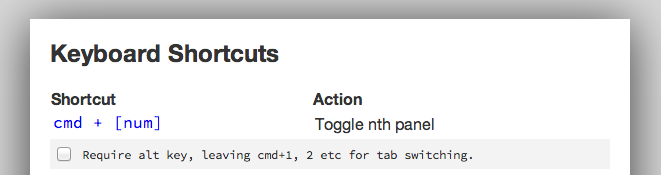
disable cmd+n

With Sublime keybindings

ShortcutAction
ctrl+shift+upMove current line, up one line
ctrl+shift+downMove current line, down one line
ctrl+dHighlight and place multiple cursor on matching words
escReturn to single cursor
cmd+ clickPlace multiple cursor at click point


Keyboard shortcuts for new Google Sites

Google-logo-keyboard

Google Sites:

Is a structured tool for creating web pages, offered by Google. The goal of Google Sites is for anyone to be able to create simple web sites that support collaboration between different editors. You can use keyboard shortcuts to help you to save time on tasks.

Keyboard shortcuts for Google sites:

ActionKeyboard Shortcut
Open shortcut menu

Ctrl + /

Open the context menu of any particular page, section, title, or embed section

Ctrl + Shift + \

Select a sectionEnter key or spacebar
Resize the embedAlt + Right or Left arrow keys
Navigate between elementsTab or Shift + Tab
Navigate the options inside a menuArrow keys
Grab a page, section, or embedEnter
Release a page, section, or embedEsc
Move the section or embedArrow key after grabbing the section or embed
Nest the pageAfter the page is grabbed, use Right arrow key
Unnest the page

After the page is grabbed, use Left arrow key

Move focus to next or previous pageUp or Down arrow keys
Expand or collapse children 

Left or Right arrow keys

Interact with elements in the focused pageTab
Grab or drop page

Space bar (arrow keys to move)

Focus first pageHome
Focus last page

End

Expand all pages

Keyboard shortcut for Full screen a YouTube

YouTube keyboard shortcut

What is the keyboard shortcut for YouTube full screen mode in Windows? 

How to go full screen mode for YouTube using keyboard shortcut in Windows 10?

How to exit the full screen mode?

Full screen mode a YouTube:

With mouse you can press a this icon  Full screen icon in the bottom to right video, or double click in anywhere of screen video display space. 

Keyboard shortcut for Full screen a YouTube in windows 10


  • Go to Full screen mode using key : J in the keyboard.

  • Keyboard shortcut to go Full screen a YouTube in Windows 10
  • Press key J in the keyboard.

  •    the 'J' key image
  • The Full screen mode be apply, and screen will be full.


Exit Full screen mode a YouTube:

With mouse you can press a this iconexit full screen icon in the bottom to right video, or double click in anywhere of screen video display space. 


Read also : List of keyboard shortcut for YouTube


Keyboard shortcut to Exit Full screen mode in Windows 10 : 


  • Exit the Full screen mode using key : Escape in the keyboard.

  • Keyboard shortcut to exit Full screen a YouTube in Windows 10
  • Press key Escape in the keyboard.

  •     the ' Escape' key image
  • The Full screen mode will be exit.

Keyboard Shortcuts for YouTube in Windows

YouTube icon - Windows 10 icon - Keyboard

In this tutorial we will discover keyboard shortcuts for YouTube, the most popular video platform.

YouTube has many great keyboard shortcuts, the card below Contain most of them.

Keyboard shortcuts card for YouTube


ActionKeyboard shortcuts
Toggle play / Pause the videok or Spacebar
Go forward 10 secondsRight arrow
Go forward 20 secondsl
Go back 10 secondsLeft arrow
Go back 20 secondsj
Restart video0 (zero)
Go to Full Screen modef
Exit Full Screen modeEscape
Go to beginning of videoHome
Go to end of videoEnd
Increase speedShift + > OR  Shift + .
Decrease speedShift + < OR  Shift + ,
Mute / Unmute the sound in videom
Move forward 1 frame when video is paused. (dot / point)
Move backward 1 frame when video is paused, (comma)
Turn captions on / offC
Move to the next video in a playlistShift + N
Move to the previous video in a playlistShift + P
Cycle through options for caption background colorb
Increase volume 5%Up arrow
Decrease volume 5%Down arrow
Skip to a particular section of the video (for example, 2 goes 20% of the video, and 5 goes to the video midpoint)Numbers 1-9